# Optimizing Your Web App: How to Score 100 on Lighthouse
Published 2023-02-21 · https://www.justjeb.com/post/how-to-score-100-on-lighthouse
Why is Lighthouse score so different from field data? What is TBT? How large bundle size and long tasks affect performance? And finally, how do you improve it? Learn all about it in this article.
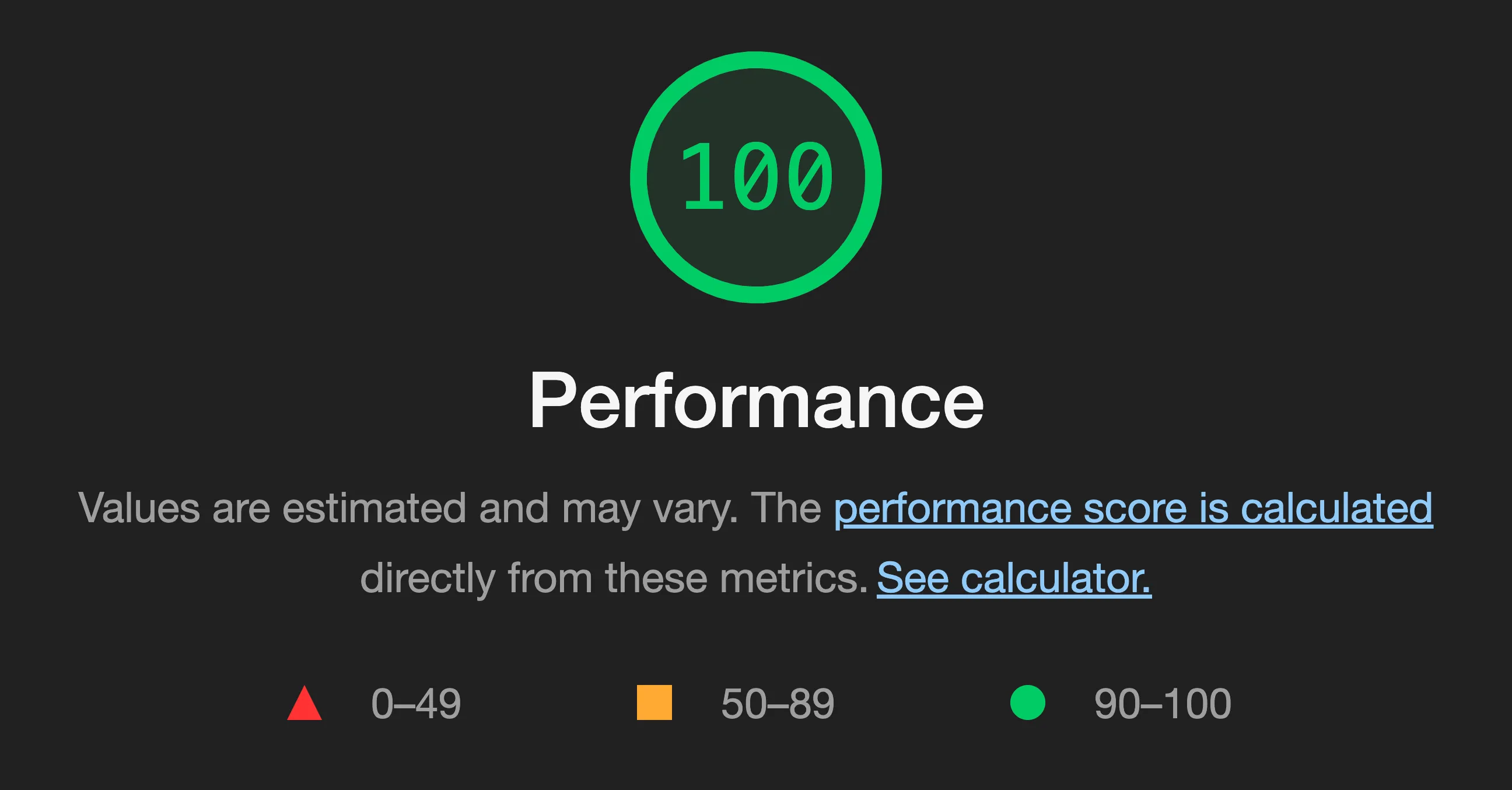
While you may be using SSR, having all the content discoverable in the initial HTML, using a CDN for caching, and following all the [best practices](https://web.dev/top-cwv-2023/) for Core Web Vitals, there’s a good chance you’re still having trouble scoring a [Lighthouse](https://developer.chrome.com/docs/lighthouse/overview/) score higher than 75.
If that's the case, you're in the right place. If not, you've got a lot of work to do, don't waste your time!
Just kidding, you really should read this even if you don't follow all the best practices.
## Why it matters
Lighthouse score may be substantially different from [RUM](https://en.wikipedia.org/wiki/Real_user_monitoring) data or [CrUX report](https://developer.chrome.com/docs/crux/) and some might even argue that the Lighthouse score doesn’t matter as long as you’re good in CrUX. And while they aren’t completely wrong, Lighthouse score does matter for two reasons:
1. It provides an estimate of the user experience for people with slow internet and low-end devices, as it runs in a simulated environment with CPU and network throttling. Improving your Lighthouse score should improve these users' experience.
2. While Lighthouse has become an industry standard, many users don’t understand the [difference](https://web.dev/lab-and-field-data-differences/) between field and lab data. They might think their site isn’t performing well or even blame it on the platform being slow, when in fact the Lighthouse score doesn’t reflect how their real users experience their site at all. But even if it doesn’t reflect the reality, it matters, because it matters to the users. Sadly, lab scores are typically low for most platforms ([source](https://almanac.httparchive.org/en/2022/cms#performance-score)):
[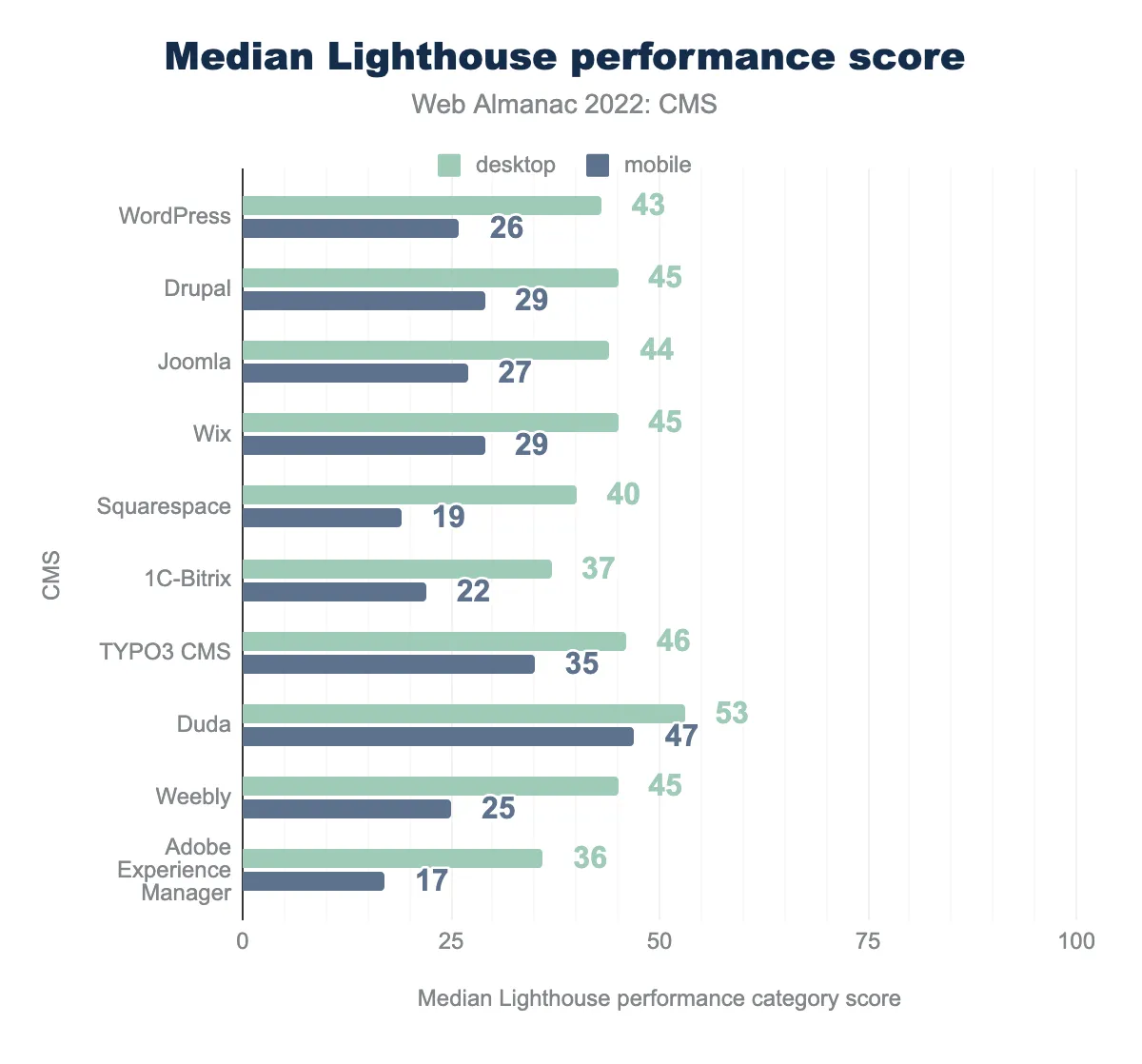](https://almanac.httparchive.org/en/2022/cms#performance-score)
## Why your Lighthouse score sucks
It's not uncommon for sites to have great Core Web Vitals but still struggle to scratch a 70 on Lighthouse score. The reason is that Lighthouse takes into account more parameters that aren't included in Google's CWV (at the moment).
[Total Blocking Time](https://web.dev/tbt/) single-handedly makes up a massive 30% of the Lighthouse score, so if you do bad on this metric, you won't be able to get a great score on Lighthouse, no matter how good your LCP or CLS score is (see the [calculator](https://googlechrome.github.io/lighthouse/scorecalc/#FCP=811\&SI=811\&FMP=811\&TTI=10975\&FCI=6500\&LCP=811\&TBT=1900\&CLS=0\&device=mobile\&version=10)):
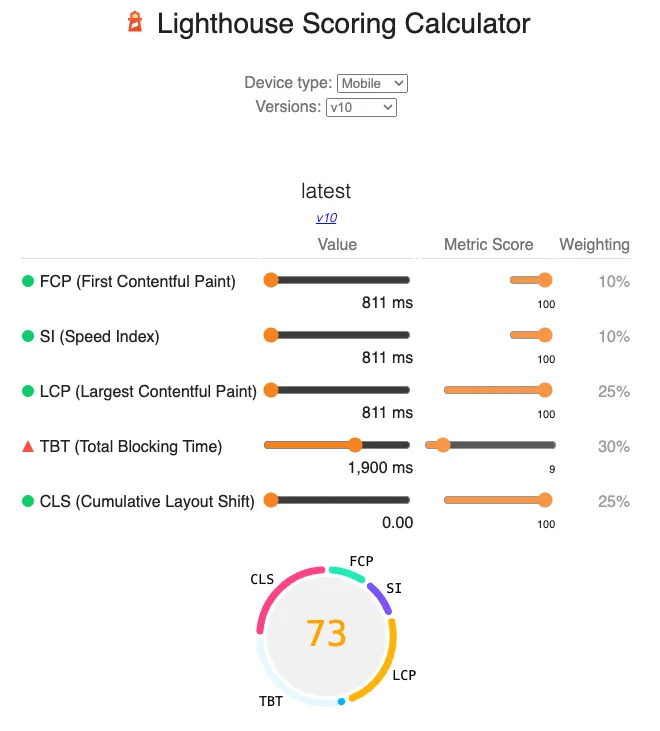
[*Time To Interactive*](https://web.dev/tti/) *is a metric that used to contribute another 10% to the Lighthouse score, but it was removed in Lighthouse v10.*
## How to fix it
TBT is a metric that is derived from Long Tasks.
A long task is any task that keeps the main thread busy for more than 50ms and thus affects the user experience.
While we won't get into the exact definition of TBT in this article, it's important to understand one key point:
> If there are NO long tasks then TBT = 0. This is the best possible outcome and this is what we should aim for.
Another important aspect to keep in mind is that [First Input Delay](https://web.dev/fid/), which is currently a part of Core Web Vitals, may soon be replaced by [Interaction to Next Pain(t)](https://web.dev/inp/), which is also largely affected by... long tasks.
To put this into perspective, the following chart shows how many websites will stop passing the Core Web Vitals assessment if INP replaces FID in CWV for each major technology ([source](https://almanac.httparchive.org/en/2022/performance#inp-as-a-hypothetical-cwv-metric)):
[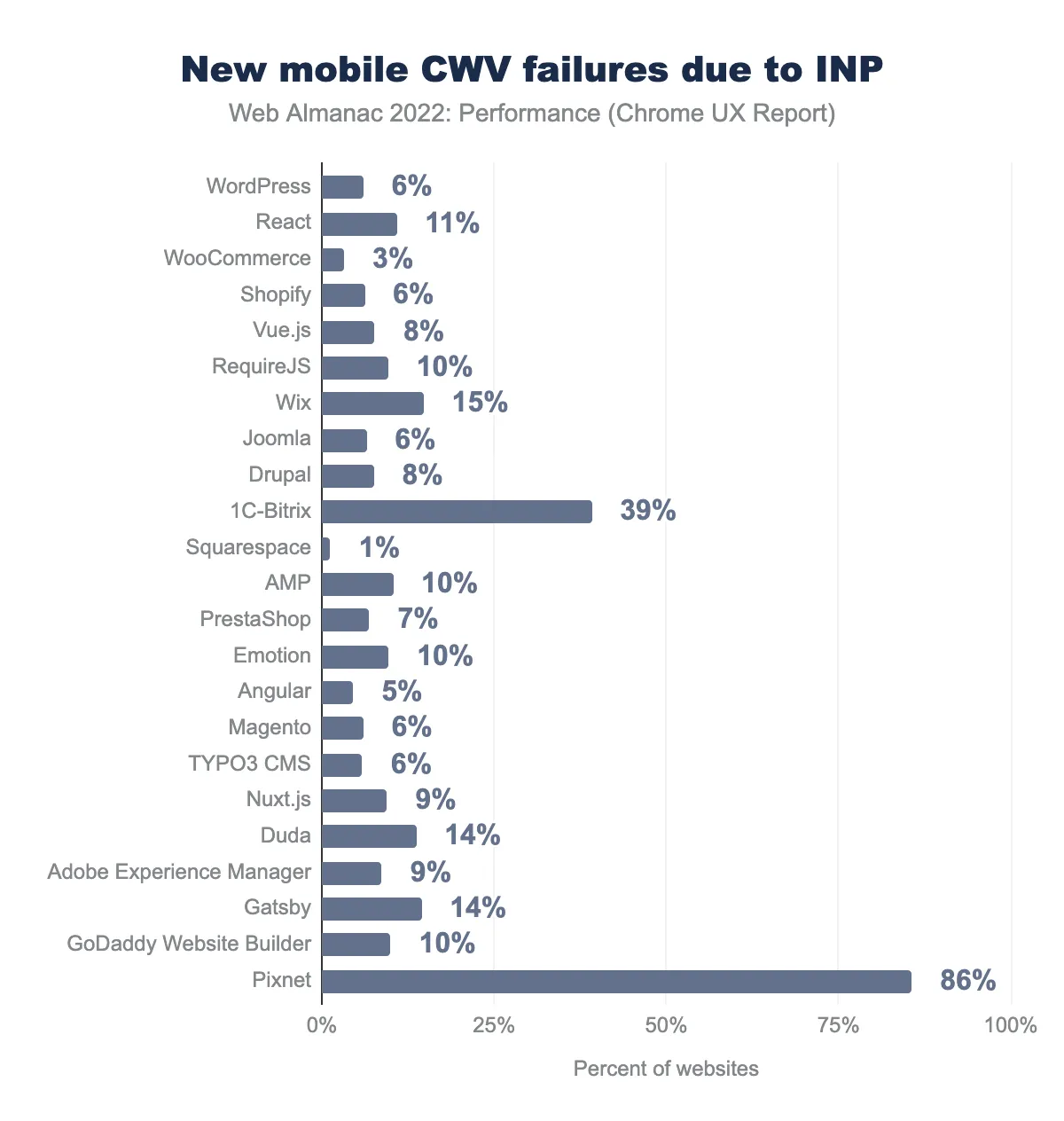](https://almanac.httparchive.org/en/2022/performance#inp-as-a-hypothetical-cwv-metric)
So, as you can see, it goes further than just Lighthouse score, soon it may affect the CWV as well.
> **Bottom line: you gotta fix those nasty long tasks and better sooner than later.**
## Types of long tasks
Long tasks come in all shapes and sizes, and they're all bad news for your website's performance. For example, you might have a heavy computation causing long tasks like in [this](https://long-tasks.justjeb.com/function/) example:
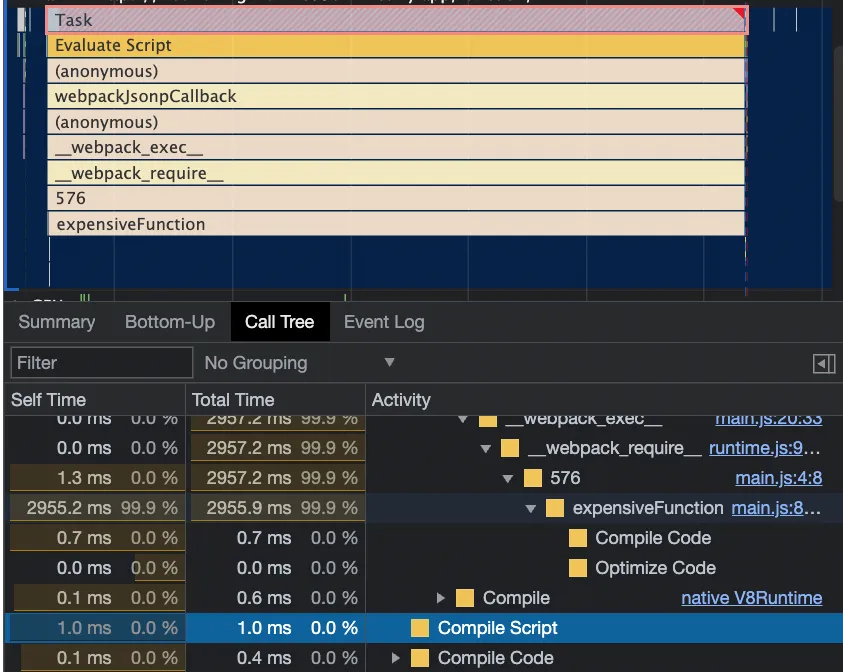
See how most of the "Evaluate Script" time is spent in the expensive function and how little time is spent on compilation? That's an easy fix - you know what's causing the problem and you can break it down into smaller parts.
Tasks like these are especially easy to solve if they are fire-and-forget (like in [this](https://web.dev/articles/optimize-long-tasks#defer-code-execution) example) or if they are already part of an asynchronous flow (like [here](https://web.archive.org/web/20230301141155/https://web.dev/optimize-long-tasks/#use-asyncawait-to-create-yield-points)). Basically, if there's no entity that depends on the result of the task right away, you can safely move the task to a separate execution chunk. We'll talk more about that later.
But there's more. When you're profiling a site with high TBT, you'll often come across tasks like this:
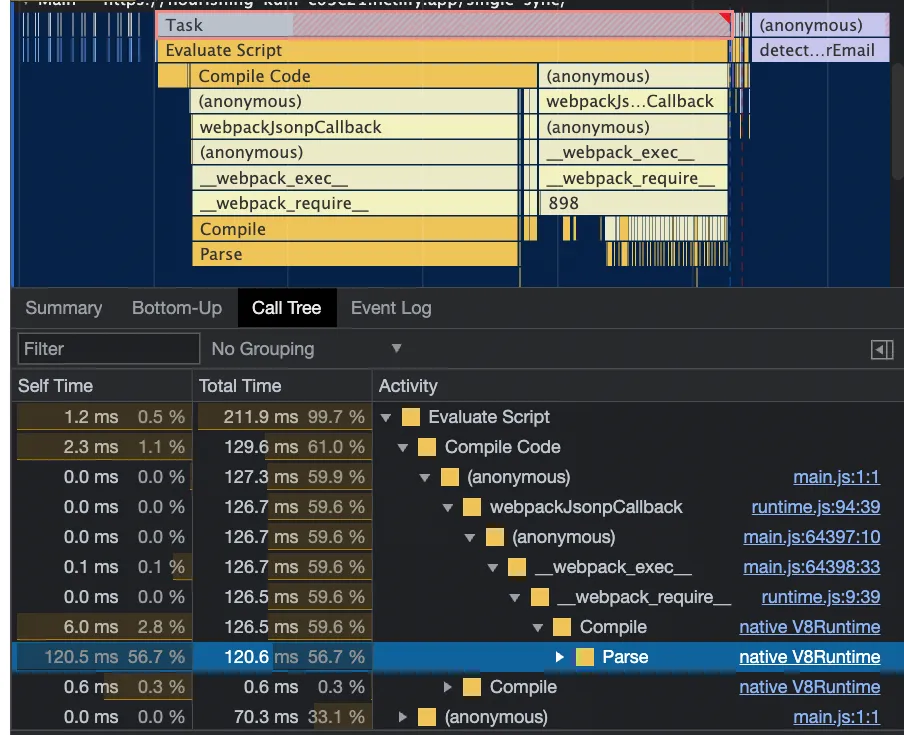
Most of the "Evaluate Script" time is spent on Compilation/Parsing, not actual execution.
Long tasks of this type often come from large bundles:
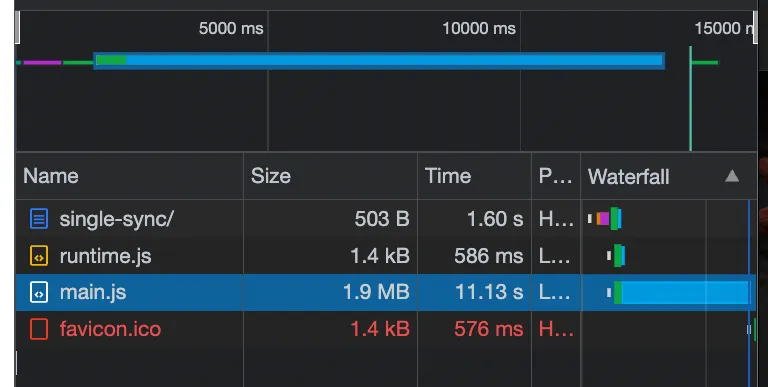
These tasks can be a bit trickier to tackle, and you'll need a deeper understanding of how the browser and its JS engine work. We'll discuss it in a bit.
## Reproducing the issue
The first step to solving any problem is to recreate it, so we're going to build a dummy app that has a long task. And to make it more realistic, the app will have multiple files that depend on each other, resulting in a large bundle size.
Each file will import data from a huge JSON file and perform a simple operation on the data. This way, nothing gets "tree-shaken" during the bundling process. The operations will be done using named functions for better visibility during profiling. Something like this:
```js
import { content } from "../generated-data/content0.js"
import * as nextFile from "./file1.js"
function concatData(nextFileData) {
return Object.values(content)[0] + nextFileData;
}
export const data = concatData(nextFile.data);
```
JSON data file:
```js
export const content = {
"4a821a450937ba4a": "7880c25b22838edb8119ef5b04d8bb42",
"f430ba93e00d68ec": "4bd3d88c235fc9386bb5be673737e8e4",
"6afd09113d8648c6": "256915ac24ecb871c690111a4c2e45fb",
"664b484c5e1de21d": "e214e6bf69f9c31793cbebbd052d34a6",
"0d02f7980f1fb1df": "d75dcedb321b8f47d500106d85ccd6d5",
"7499e36ff8cceab6": "cd6bb4a57c31727527021911fd2e7970",
"c29c4c8076e4ed1e": "c369d70350171d93cb12d47115da89ac",
etc...
```
Of course this whole thing will be generated, I'm not a maniac to do all this by hand.
The eventual result will be printed out to console:
```js
import { data } from './generated-sync/file0.js';
console.log(`That's the string: ${data}`);
```
We'll use Webpack to bundle the code and include it in an HTML file as a script tag. For simplicity's sake, we'll sacrifice some performance for visibility, by tweaking the optimization property in Webpack config.
```js
{
entry: './src/index-sync.js',
output: {
path: path.resolve(__dirname, 'dist/single-sync'),
},
plugins: [
new HtmlWebpackPlugin({
template: 'src/templates/index.ejs',
})
],
optimization: {
minimize: false,
chunkIds: "named",
runtimeChunk: 'single',
},
}
```
The final bundle size will be **3.7MB** (1.9MB compressed).
The app is [available](https://long-tasks.justjeb.com/single-sync/) online for you to play around and follow along with the article, and its source code is available on [Github](https://github.com/just-jeb/long-tasks-playground/tree/main/src/generated-sync) in case you'd like to take a look or suggest an improvement.
Finally let's validate that what we think is an issue is also considered an issue by Lighthouse (after all, Lighthouse is the reason you're reading this article):
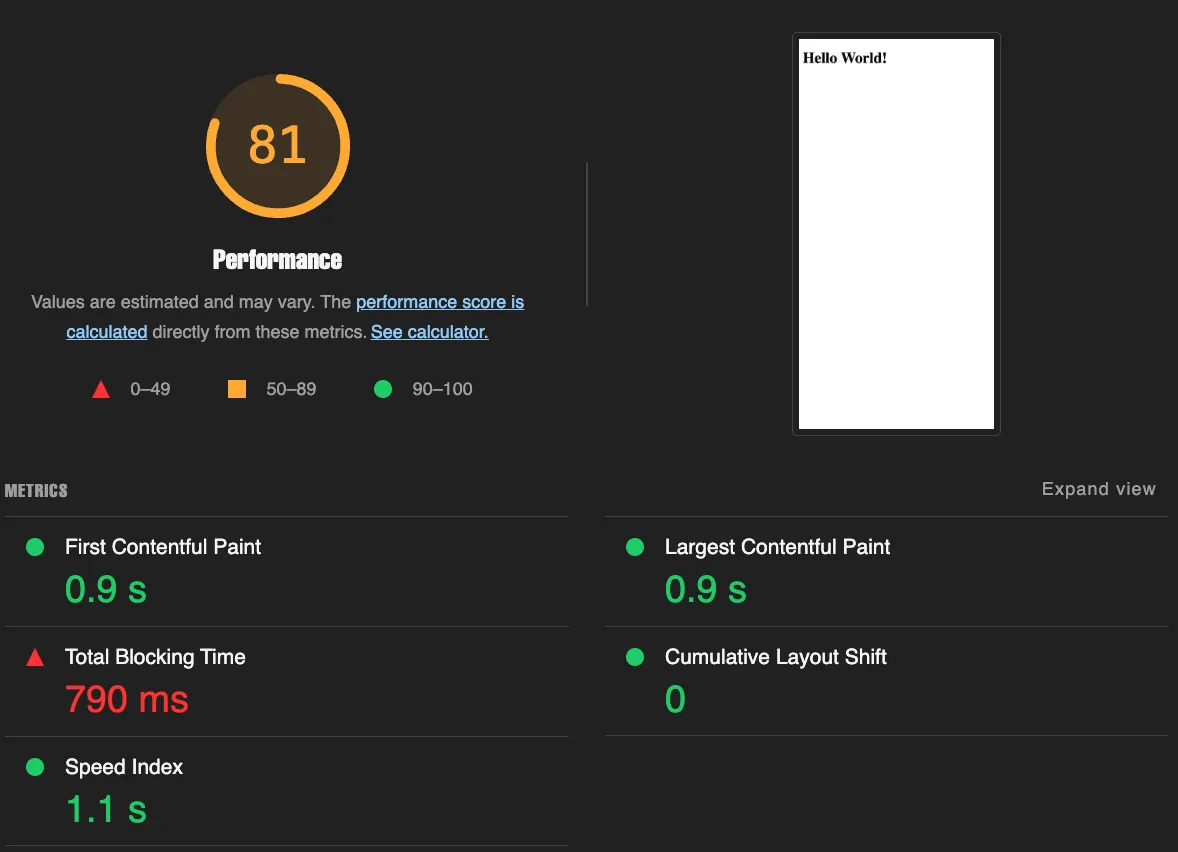
As you can see we have an agreement here and it's a perfect reproduction of the issue - all the scores are excellent except for TBT. Now let's solve it!
## Breaking up the bundle
If we profile this page with x4 CPU throttling, simulating a slow device, that's the picture we'll get:
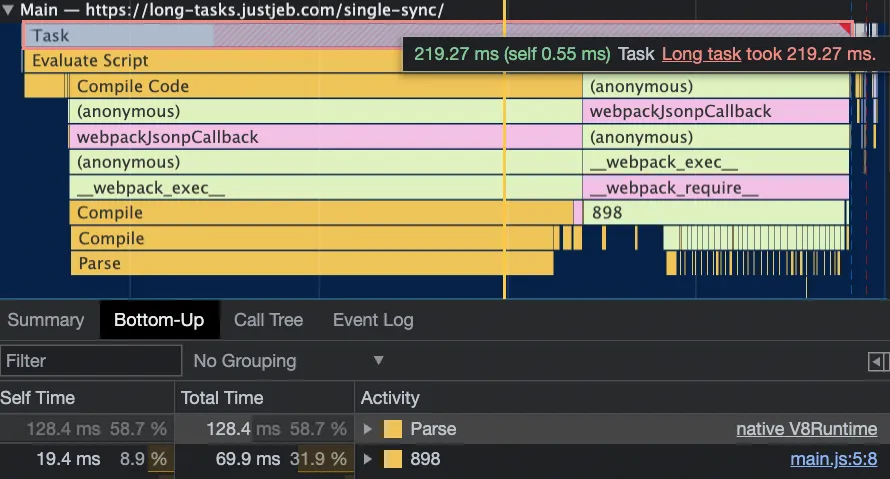
As we know, a long task is defined as anything over 50ms. Well, this one is definitely over that with **219ms**.
And if we look at what's contributing the most to this long task, we see it's mostly due to parsing the bundle (128ms).
Sure, the **concatData** functions also play a role, adding up to 69ms, but they're not as big a factor as the parsing:
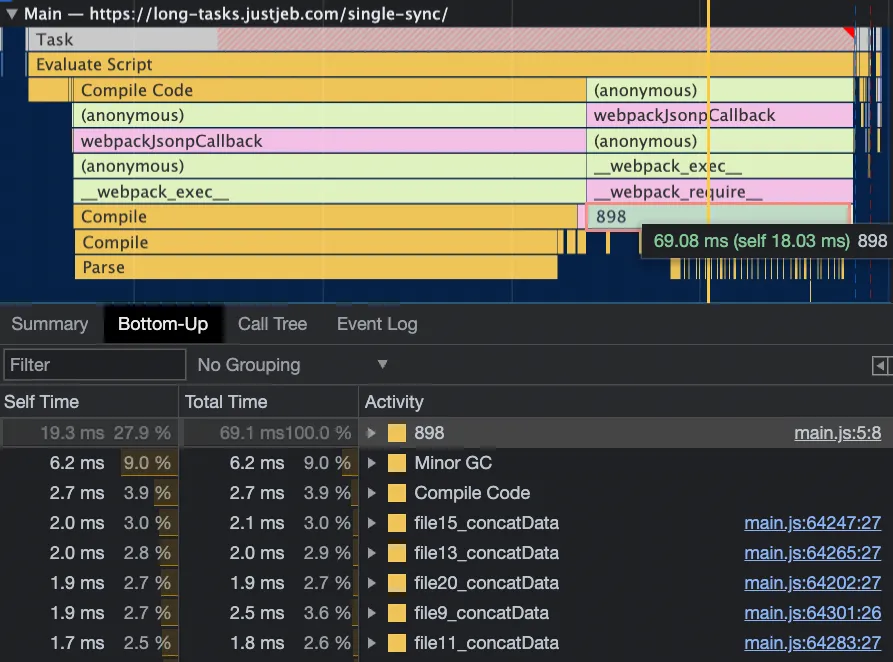
So, since parsing is the main culprit here, let's try to break it up.
The easiest way to do this is by using Webpack to do it for us. Here's how:
```js
{
entry: './src/index-sync.js',
output: {
path: path.resolve(__dirname, 'dist/split-sync'),
},
plugins: [
new HtmlWebpackPlugin({
template: 'src/templates/index.ejs',
})
],
optimization: {
minimize: false,
chunkIds: "named",
splitChunks: {
chunks: 'all',
maxSize: 50000
},
runtimeChunk: 'single',
},
}
```
We've just added a splitChunks configuration that tells Webpack to break up any chunk that weighs more than 50KB.
Webpack will then create multiple chunks, each weighing around 120KB. This is the best Webpack can do, considering we have large data files.
Each chunk will also act as an entry point and be added to the HTML. This is because we haven't specified when to load them, just how to split them:
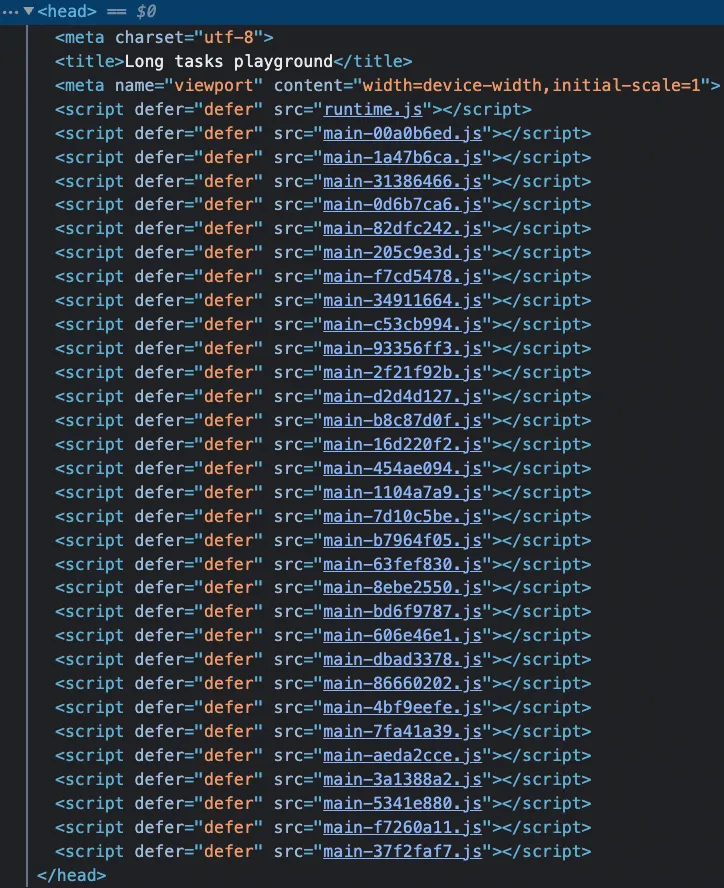
Now, instead of having one large bundle of 3.7MB, we have 30 smaller chunks of 120KB. They'll be parsed independently, breaking up the long task, right?

Let's run Performance Profiling on [this](https://long-tasks.justjeb.com/split-sync/) version of an app and find out:
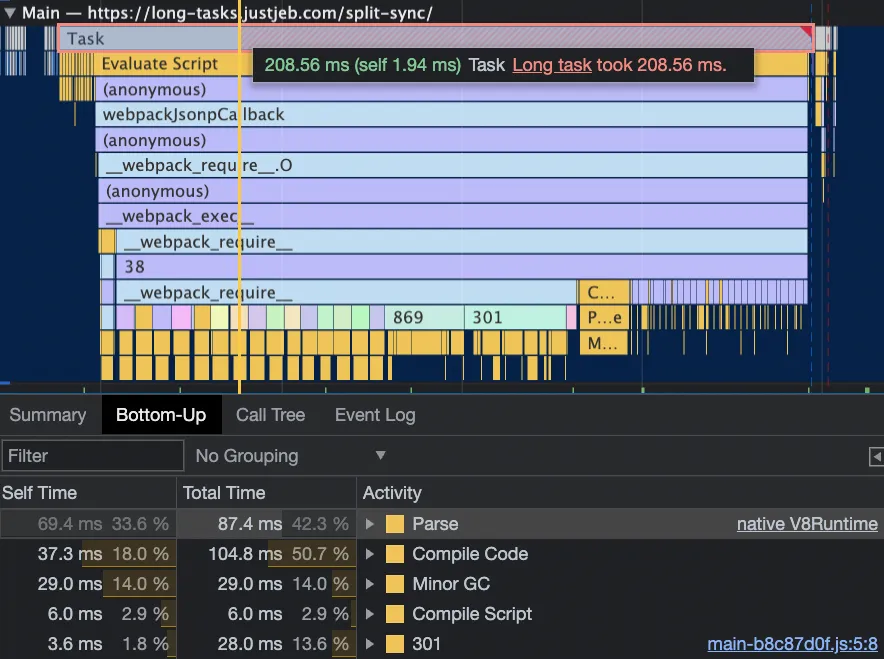
Unfortunately, not much has changed. We still have the same long task that takes the same amount of time and the distribution between parsing/compilation and execution is pretty much the same.
The only difference is that the parsing is done in smaller pieces instead of one big chunk. This is natural, since we have multiple entries and Webpack will execute them as separate function calls.
But why didn't it break up the long task? The answer is simple - it's still synchronous.
All we did was break down the big bundle into smaller ones, but the browser still waits for all the chunks to load before evaluating them all as part of **one synchronous flow**.
Our files are arranged in a way where one file imports another, and so on. So, to execute the code in the topmost file, we first need to import and execute all the others, and all of this has to be done synchronously.
No matter how you arrange the chunks, the main thread will still execute them all at once and won't have a chance to catch its breath in between.
> Semantically our execution flow is still synchronous and Webpack cannot automagically make it asynchronous.
**This is an important observation #1**.
## Breaking up the synchronous flow
We now understand that instead of breaking up the bundle, we need to break up the synchronous execution flow. Let's use the [techniques](https://web.archive.org/web/20230301141155/https://web.dev/optimize-long-tasks/#use-asyncawait-to-create-yield-points) we talked about earlier to do that.
Instead of immediately executing the concatenation as we import, we'll turn the flow into an asynchronous flow and yield to the main thread before concatenating in each file.
```js
import { content } from "../generated-data/content0.js"
import * as nextFile from "./file1.js"
async function concatData(nextFileData) {
await new Promise(resolve => setTimeout(resolve, 0));
return Object.values(content)[0] + nextFileData;
}
export const data = nextFile.data
.then(concatData);
```
*Note that while using* ***setTimeout*** *will indeed yield to the main thread, it’s not necessarily the best way to do that. Read more about different approaches* [*here*](https://philipwalton.com/articles/idle-until-urgent/)*.*
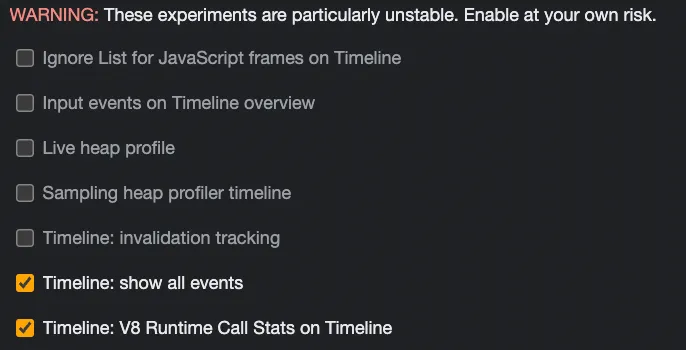
To get even more insight into what's happening inside the flow, let's enable **"Timeline: show all events"** (go to **DevTools->Settings->Experiments** and check the checkbox):
Let's see if our change made a difference. The updated version is available online [here](https://long-tasks.justjeb.com/split-sync-yield/) so you can check it out yourself.
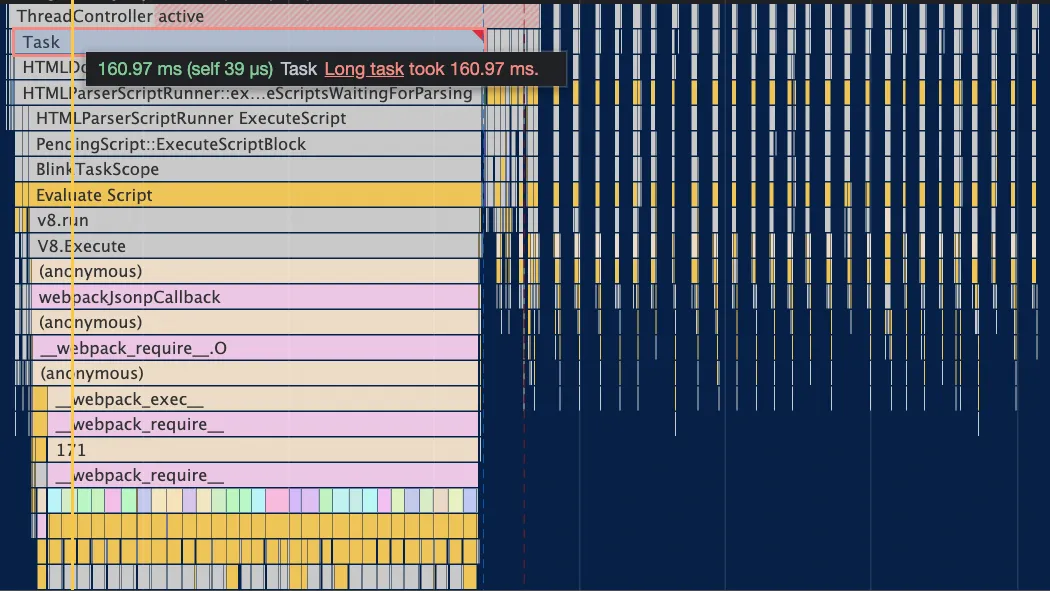
As you can see, this change does indeed reduce the time of the long task by splitting it into multiple separate tasks that come later.
You can read more about **WHY** it worked in my other in-depth blog post: [Why does your page freeze after a click?](https://www.justjeb.com/post/why-does-your-page-freeze-after-a-click)
If we zoom in a bit, we can also see exactly what moved into a separate task and what was left in our long task.
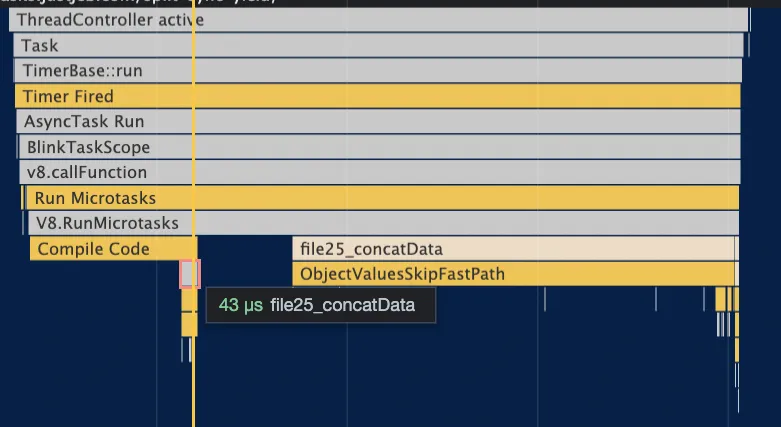
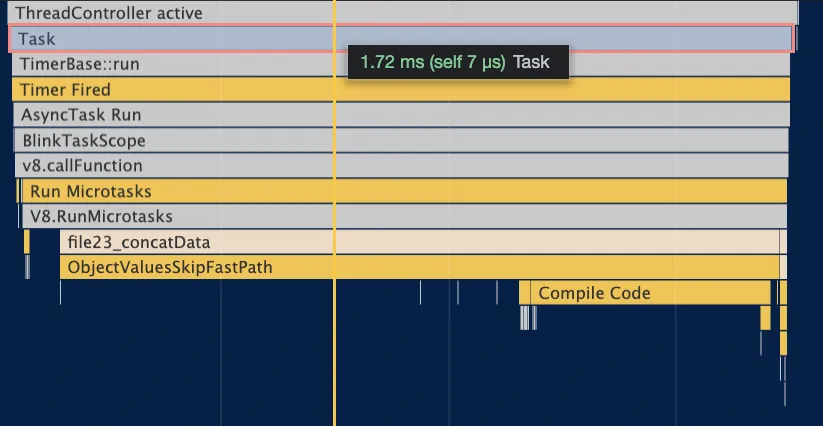
As expected, the execution (and so the parsing and compilation) of **concatData** has moved into a separate task because we broke up the execution flow and yielded to the main thread.
However, the parsing and execution of the JSON data object, which also takes up more time, is still part of the long task:
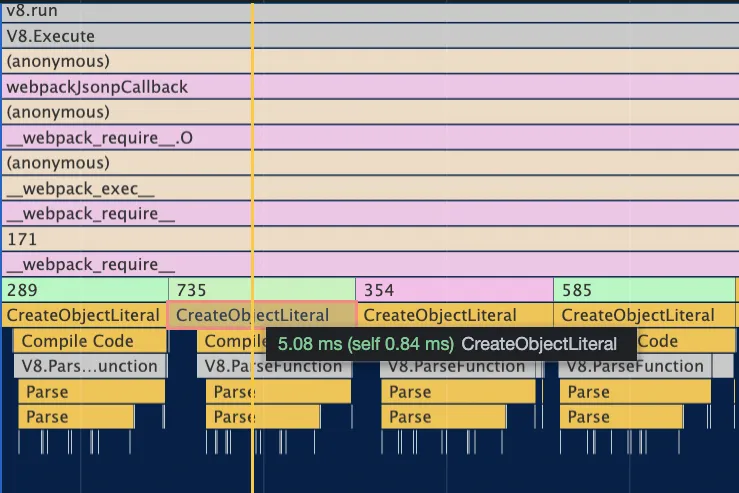
And when you think of it, it makes complete sense.
We separated the concatenation, but the data object creation is still part of the synchronous import flow.
In order to better understand what that means, let's talk about the basics, which is how and *when* our code is executed.
## Evaluation and Compilation
To highlight this point, let's run a simple experiment. We'll generate a single file with a lot of code, but we'll run only minimal portion of it.
A file will look like this:
```js
invokedFunction();
function invokedFunction() { console.log('invokedFunction'); }
function delayedFunctions() {
function func0() { console.log('func0'); }
function func1() { console.log('func1'); }
function func2() { console.log('func2'); }
function func3() { console.log('func3'); }
function func4() { console.log('func4'); }
function func5() { console.log('func5'); }
...etc
function func299999() { console.log('func299999'); }
}
```
As you can see there are a lot of functions but only one of them is actually invoked. Moreover, the vast majority of the functions are not even *declared* on the global scope.
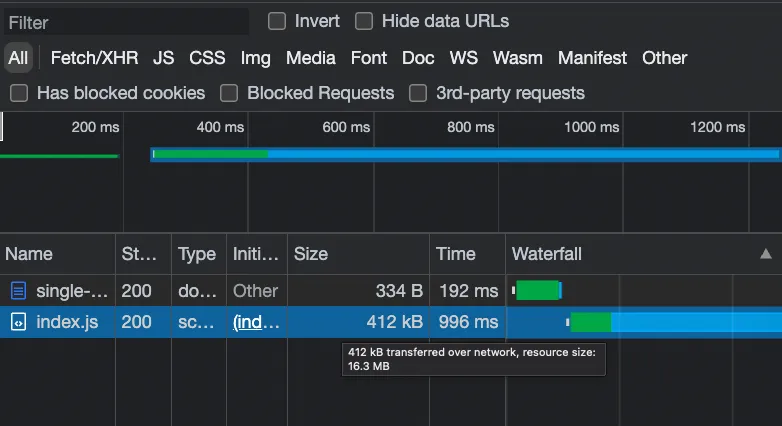
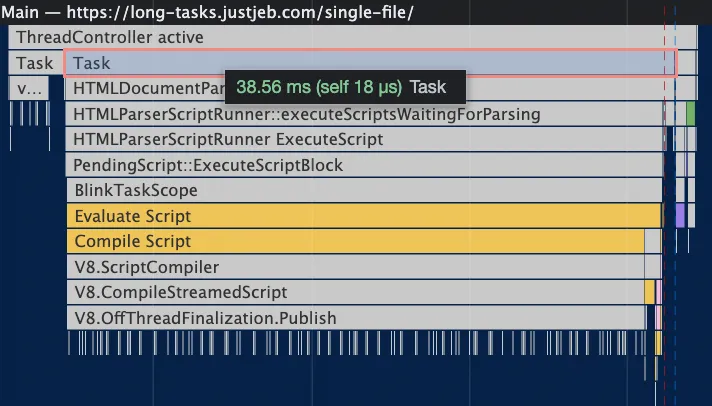
If we run the Profiler on the [page](https://long-tasks.justjeb.com/single-file/) that loads this script, with x4 CPU throttling this is what we'll get: 1. An enormous bundle that weighs **16MB** (which by far exceeds our **3.7MB**):
2\. A longest task that takes less than **40ms**:
And if we run Lighthouse on this page, we won't see any blocking time at all:
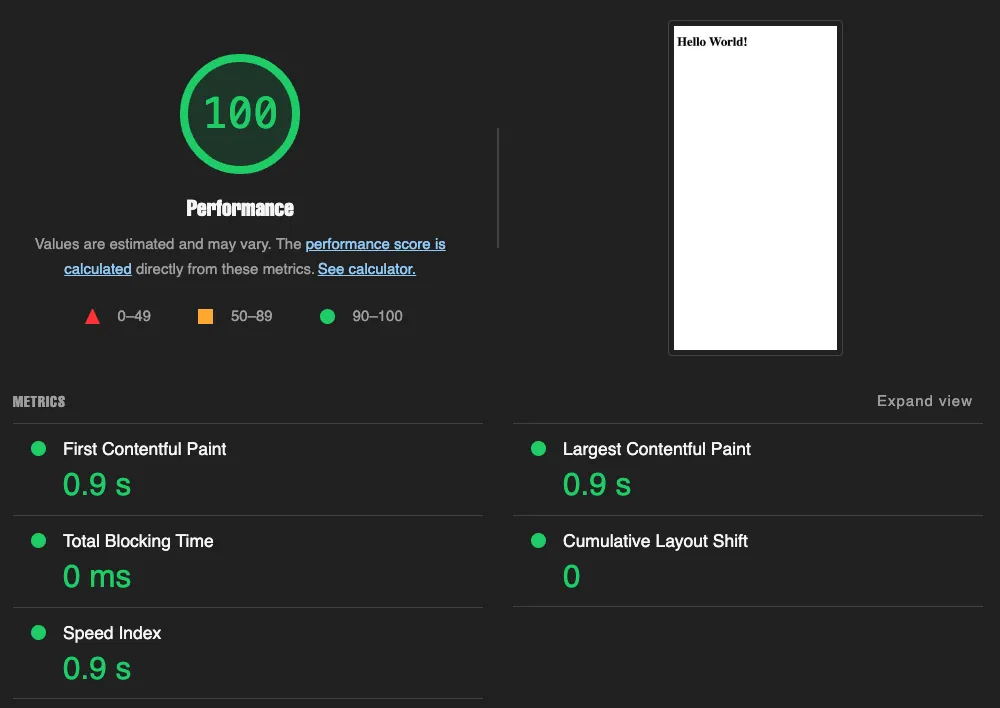
So... Huge bundle, yet no long tasks. *Why is that?*
The answer lies in the way browser executes JavaScript.
JavaScript implementations (such as Chrome's V8 engine) use interpreter as well as JIT (Just-In-Time) compiler to run the code.
There are three phases involved when the browser evaluates your JavaScript:
1. **Parsing:** Breaking the code into smaller pieces and converting it to an Abstract Syntax Tree (AST).
2. **Compilation:** Using an interpreter to turn the AST into byte code, and further optimizing parts of this byte code, such as frequently used functions or variables, into machine code with the help of a JIT compiler. This optimized code can then be executed directly on the processor without the need for any abstraction layer.
3. **Execution:** Running the byte code
***All this is performed on demand - whenever your code is called (interpreted).***
In our experiment there are two global declarations that have to be executed and one invocation, but the inner functions only get a quick pre-parse and are never fully parsed or compiled, because no one invokes them.
Check out [this](https://www.geeksforgeeks.org/how-v8-compiles-javascript-code/) intro article to see a more in-depth explanation of how the V8 engine, used in Chrome, processes your code.
> Because of the interpreter + JIT compilation, with rare exceptions, your JavaScript won't be parsed, compiled or executed until it's actually needed at runtime.
**This is an important observation #2.**
## Delaying Global Scope Execution
Alright, now that we have a basic understanding of how JS code is processed, it's time to get back to the long tasks issue. The problem is that the data object is defined and exported in the global scope, so it's executed immediately as soon as we import the file. But what if it was a function instead of a variable? Let's find out. Check out the updated code for the data file:
```js
export function content() { return {
"87d16c502b5fd987": "af8847746f39da6ef161cf98b85eb22e",
"6ac7b1ba2b5f3bfc": "a58e07176ee40f2296fab9b723e217b4",
"c91fac8faede48bb": "c3de08c8cd3dc73433e585d11d2a3d58",
"c0461c267521f1b8": "59cfc52eb6a2b3d8c5cabcea1ed77d70",
"c4823fc77d9b41e7": "d1814f8df7d0e9647e91af3c42fc5842",
"687f9ed6b9e71d77": "97c10c3dda62e60ce0521e681f707929",
"4328c63b235a1b40": "398775296b85a496927f832f7ae04182",
etc...
```
See the named function again (visibility, remember?).
And the updated code for the logic:
```js
import { content } from "../generated-data/content-fn0.js"
import * as nextFile from "./file1.js"
async function concatData(nextFileData) {
await new Promise(resolve => setTimeout(resolve, 0));
return Object.values(content())[0] + nextFileData;
}
export const data = nextFile.data
.then(concatData);
```
The updated app is available [here](https://long-tasks.justjeb.com/split-sync-yield-func/) for you to follow along.
Now, let's see what's changed:
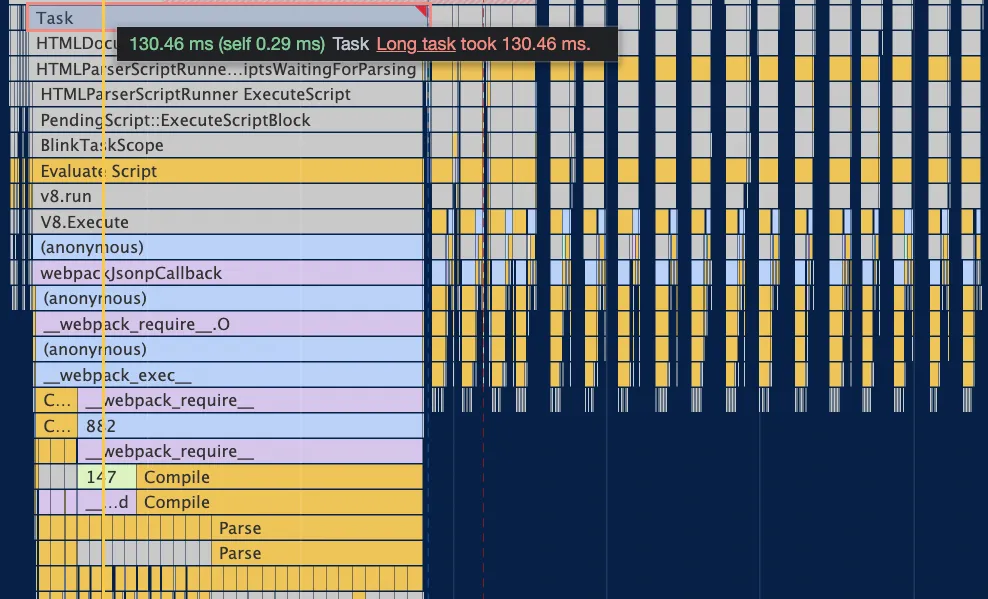
The long task has reduced even further, and the individual concatenation tasks have gotten bigger. Zooming into one of the small tasks can give us a better idea of what's changed:
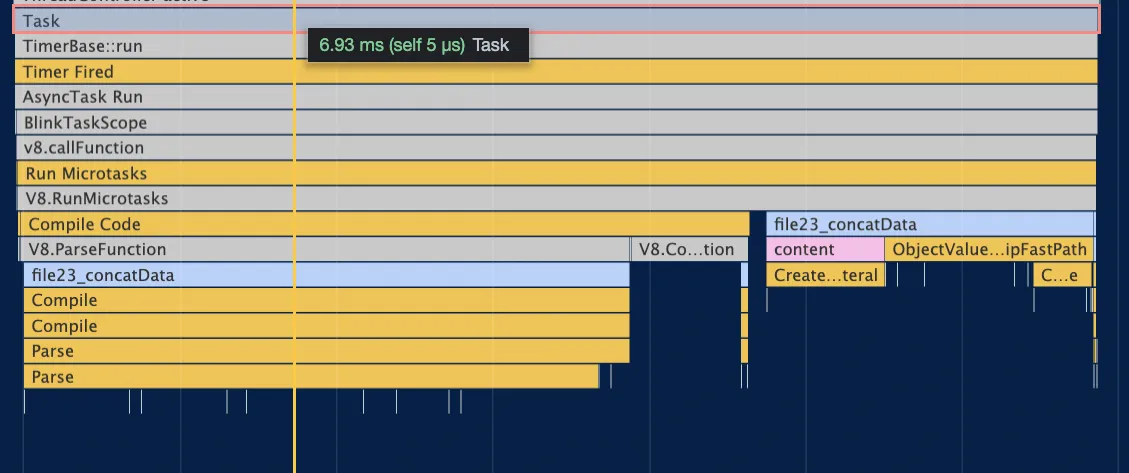
As expected, the parsing and creation of object literal moved to the **concatData** task. Compared to the previous **concatData** task, it grew by about 5ms, which just happens to be the time it took to execute **CreateObjectLiteral** in the synchronous flow.
> By reducing the amount of code executed in the global scope and delaying it by moving it to a function, you can expand your options and have more control over the execution path.
**This is an important observation #3.**
## Bundlers and Auto Generated Code
So far, we've done the best we could to delay and isolate our code execution flow, and there's not much left we can do on this matter. We've also seen that simply splitting our bundle into multiple chunks doesn't help much, as the execution flow of these chunks remains synchronous.
In fact, if we keep all the code changes we made but remove the **splitChunks** configuration, the big picture remains the same:
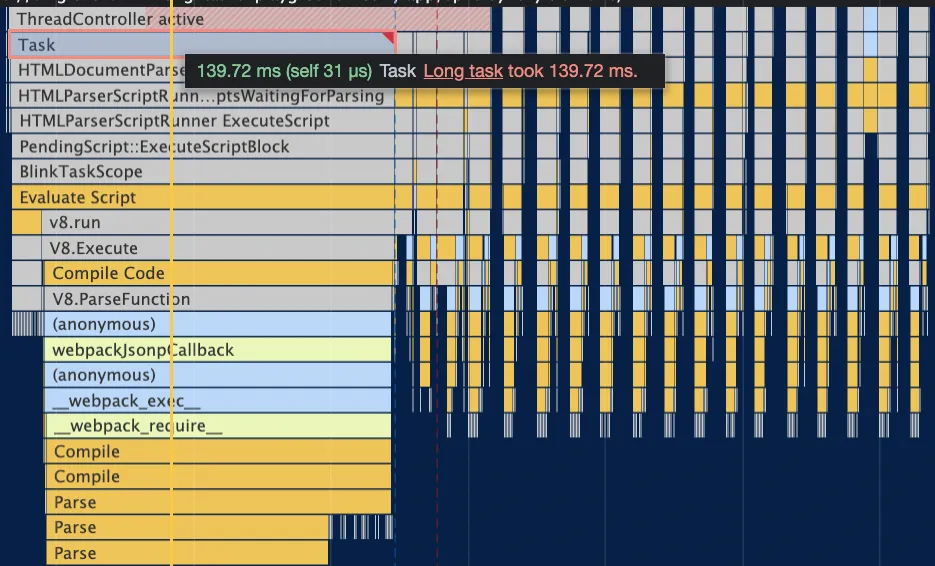
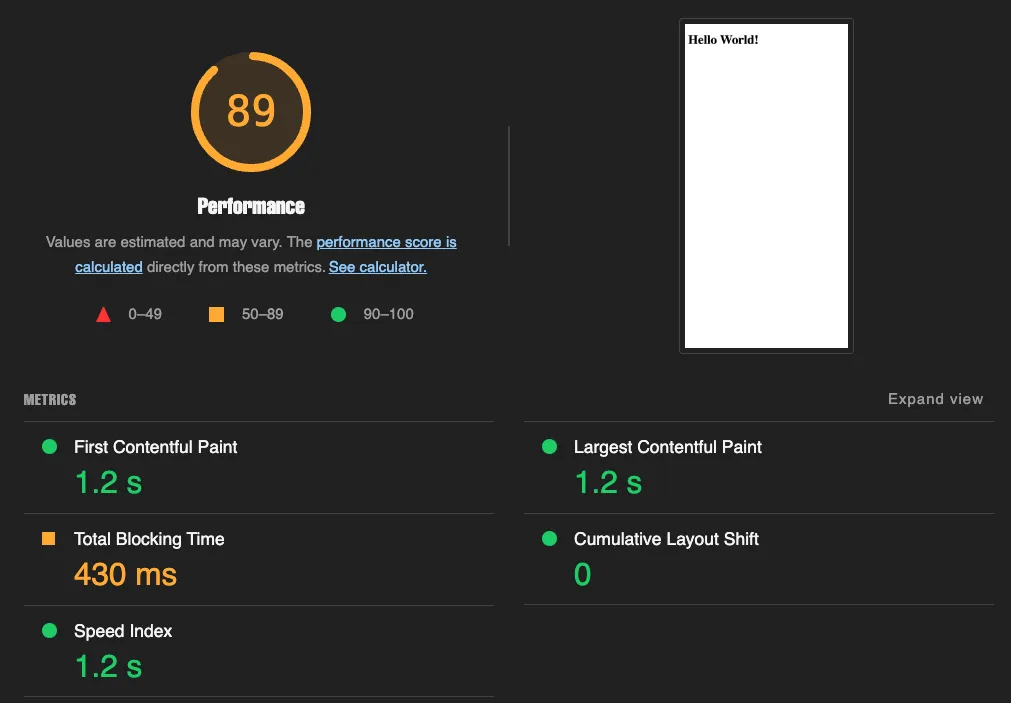
We've also made some improvement in the Lighthouse score, but it's still far from the 100 we desire.
So what else can we do?
To answer this question, we need to look at what's left inside the long task. If we refer back to the screenshot, we'll see that it's all from Webpack:

Webpack, along with other bundlers, generates some code around our modules, to make all the imports and exports work across different chunks. This code mainly consists of IIFEs (Immediately Invoked Function Expressions) and various runtime utility functions (such as **webpackJsonpCallback** and **\_\_webpack\_require\_\_**), which handle all cross-module dependencies and decide when our code can or cannot run, depending on which chunks have been initialized.
And this code... Well, this code still runs synchronously because we need all of it to run our code. What we need to do is break up this code into smaller pieces and give the main thread some space in between. If only there was a way to load the chunks on demand...
## Proper Code Splitting
Usually, we consider code splitting and dynamic imports for parts of our code that aren't immediately needed. For instance, if a button on a page opens a popup, the code for the popup can be dynamically imported and executed only when a user clicks on the button.
However, that's not always the case. Sometimes, we need all the code immediately, like in our example where we log the final result of all the concatenated strings to the console.
Does this mean that the code can't be split into smaller chunks? Not at all! In fact, as we've seen, the execution of all the utility Webpack code at once can cause significant performance degradation.
Let's incorporate dynamic imports in our generated code.
```js
import { content } from "../generated-data/content0.js"
async function concatData(prevFile) {
const { data } = await prevFile;
return Object.values(content)[0] + data;
}
export const data = import("./file1.js")
.then(concatData);
```
To make it a pure experiment, we'll drop all the execution flow improvements we made previously and only change the import flow, which will implicitly affect the execution. The content is still imported synchronously, but the synchronous behavior is limited to just this specific file chunk, as we import the next file dynamically.
The updated version of the app is available [here](https://long-tasks.justjeb.com/split-async/) for you to follow along. Let's see what's changed!
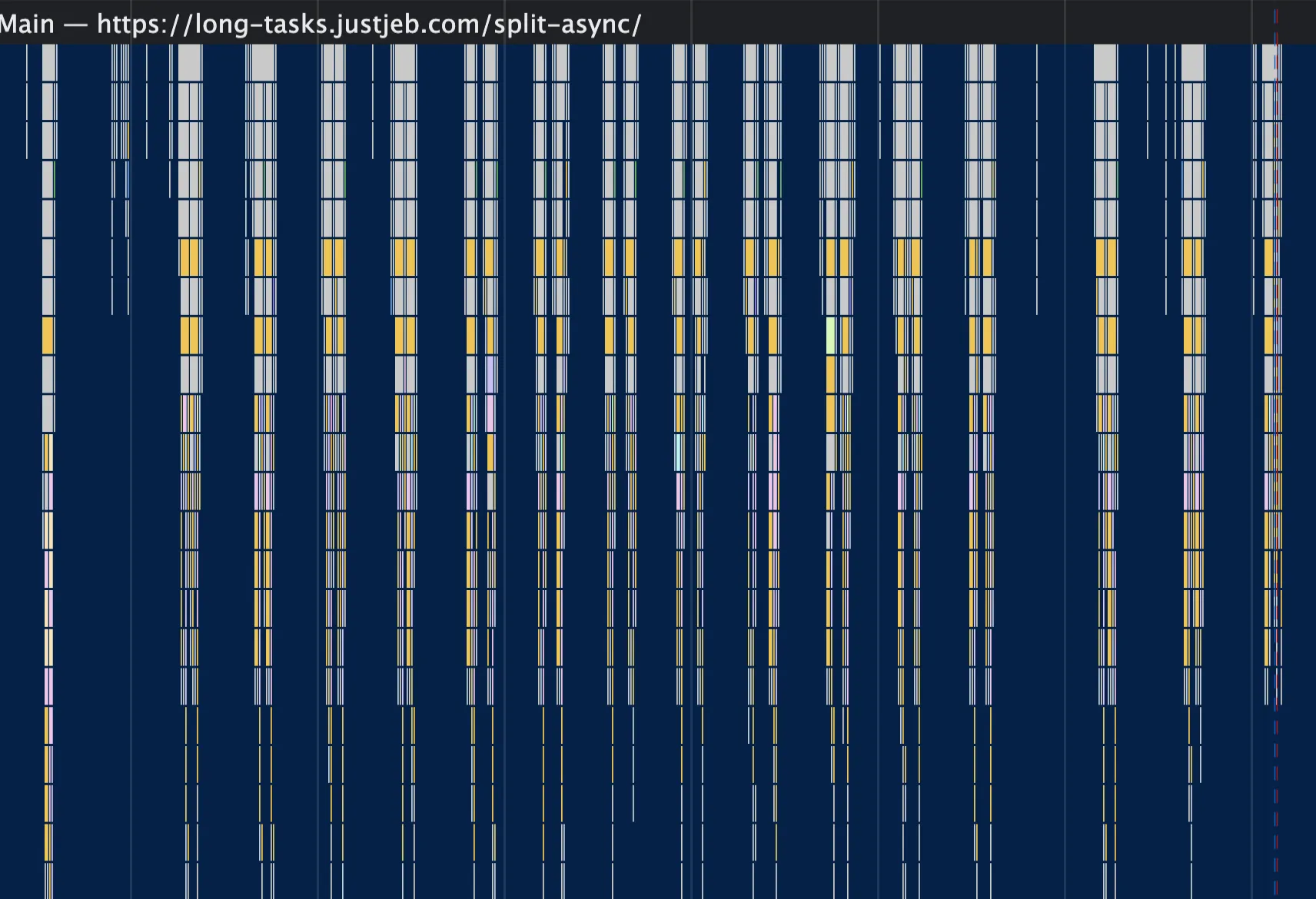
**No more long tasks!**
Let's take a closer look.
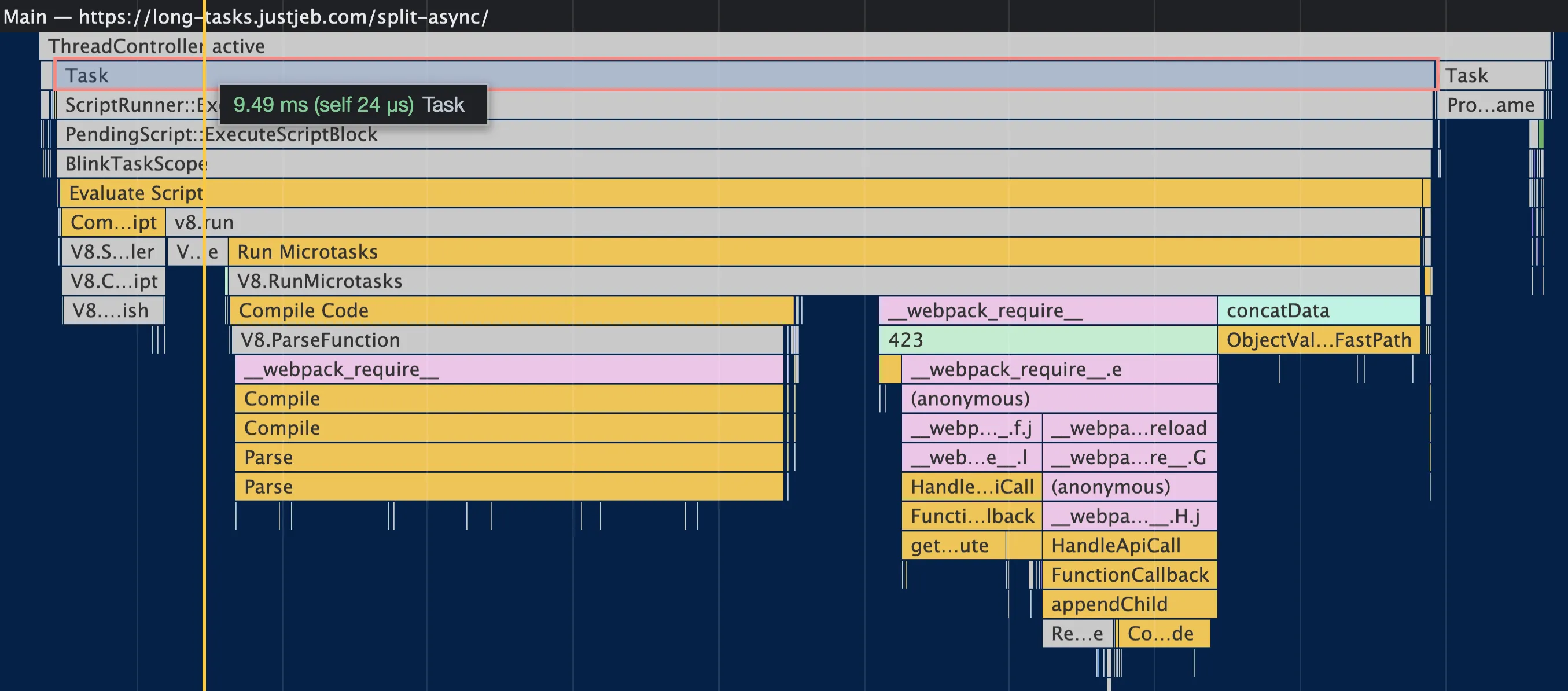
The code semantics have changed. Instead of importing everything and delaying the execution, we now explicitly state when the import (and hence the loading of the chunk) should happen in the code. The logic runs right after the import has been completed.
This allows Webpack code and our code to be executed in a separate task, giving the main thread some breathing room.
From the [Lighthouse perspective](https://pagespeed.web.dev/report?url=https%3A%2F%2Flong-tasks.justjeb.com%2Fsplit-async%2F), we're doing great, with no long tasks meaning TBT = 0.

Mission accomplished!
Or is it?
## The Tradeoffs
Every solution comes with a cost, and this situation is no exception.
While we achieved a 100 score on Lighthouse, this doesn't necessarily mean our app is performing optimally.
By using dynamic imports to split our code into different chunks, we have created a waterfall effect where each file must be loaded before the next one can be requested.
We can attempt to improve this by preloading the next chunks, but this will only make the chunks load in pairs, instead of one at a time.
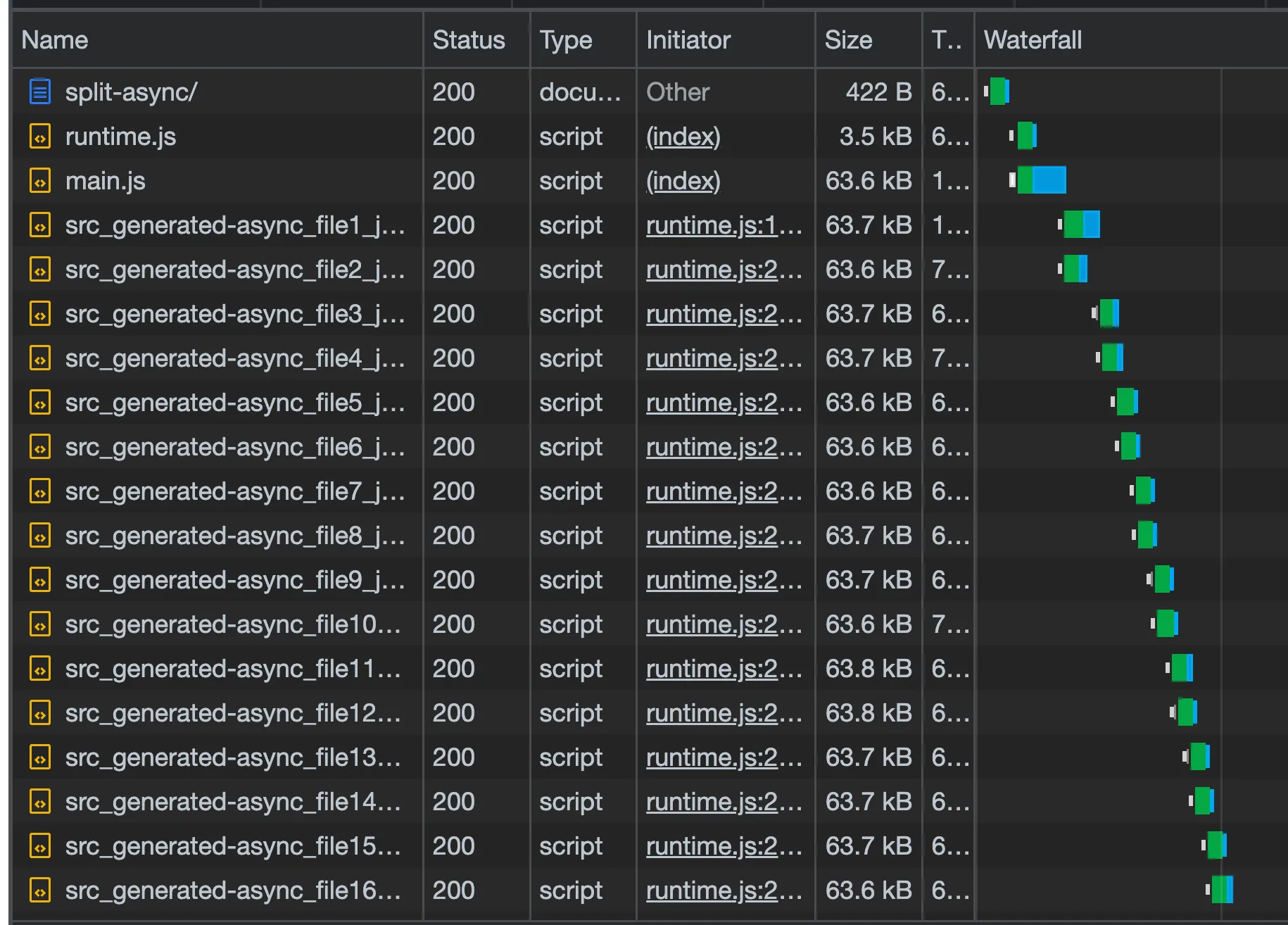
And this can have a negative impact on the user experience, as the execution of our code is now spread out over several seconds, instead of a few hundred milliseconds as before.
While it doesn't make a difference in our example (since all we do is log the result), it can have significant consequences in other use cases.
> Lighthouse score of 100 does not guarantee a great user experience
**This is an important observation #4.** However, this is not an insurmountable issue. By making some changes to our HTML template and utilizing **HtmlWebpackPlugin**, we can preload the chunks in the HTML.
```html
Long tasks playground
<% compilation.chunks.forEach(function(chunk){ %>
<% chunk.files.forEach(function(js){ %>
<% }); %>
<% }); %>
```
The updated app is available [here](https://long-tasks.justjeb.com/split-async-preload/) for you to follow along.
Now, let's see what's changed.
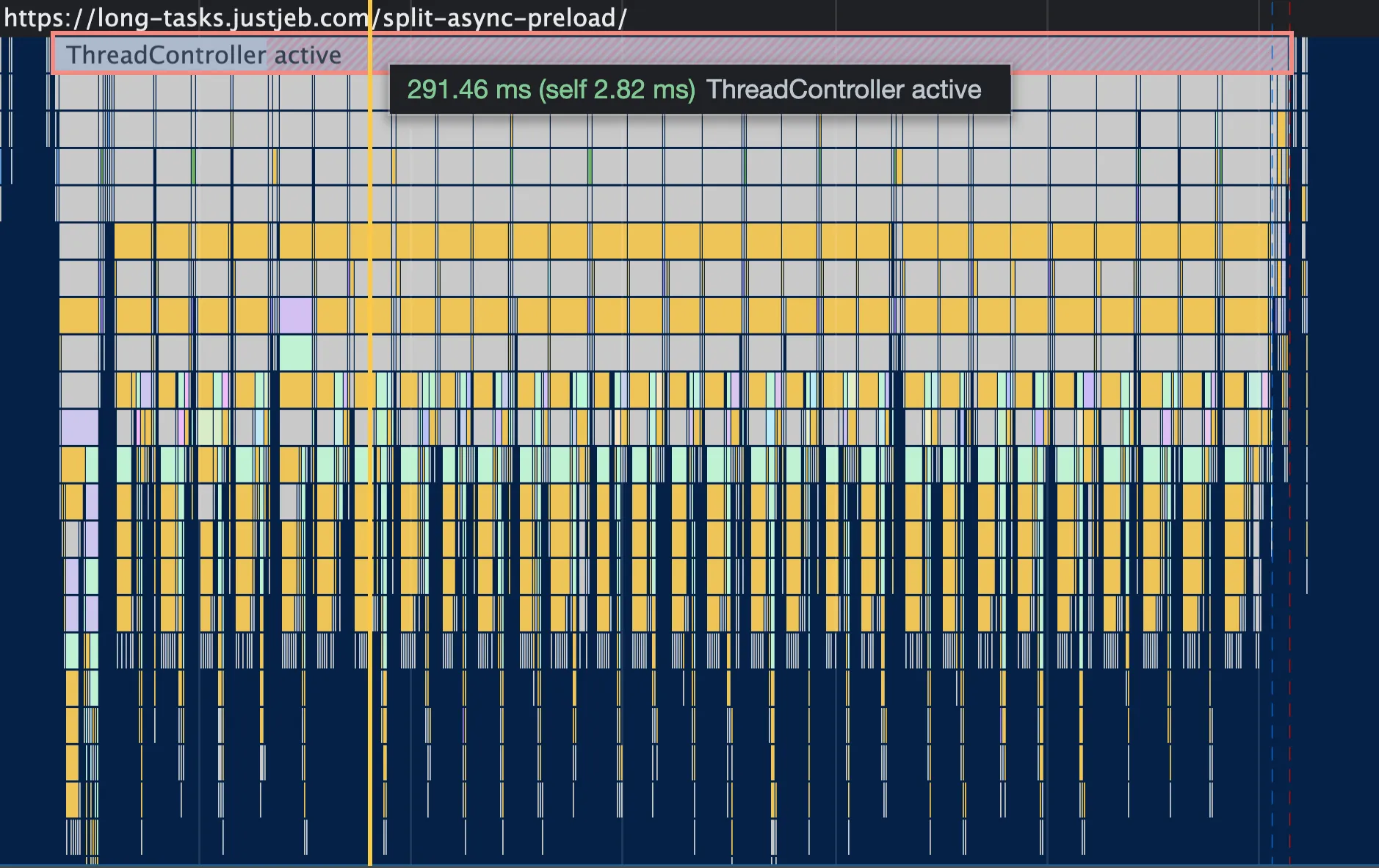
We're back to the original execution time of a few hundred milliseconds, but now the code is executed in smaller, adjacent blocks. No more long tasks, no compromised runtime performance, and still a 100 on the [Lighthouse score](https://pagespeed.web.dev/report?url=https%3A%2F%2Flong-tasks.justjeb.com%2Fsplit-async-preload%2F).

## Summing It Up
So, did we achieve our goal? Yes, we got a score of 100 on Lighthouse.
Is this the right solution for this particular use case? Absolutely! We're still doing the same thing, but without blocking the main thread.
Does this solution work for every use case? No way!
Each use case is unique and there's no one-size-fits-all solution, just like there is no automagical solution with Webpack configuration that will solve the long tasks issue.
Therefore it's important to understand the core principles rather than blindly splitting your code into chunks or delaying the execution of everything.
So let's reiterate on the observations we had:
- **#1 A small bundle size doesn't necessarily mean low TBT** Even if you split your bundle to multiple chunks, semantically the execution flow is still synchronous and Webpack cannot automagically make it asynchronous.
- **#2 A large bundle size doesn't necessarily mean high TBT** Because of the interpreter + JIT compilation, your JavaScript won't be parsed or compiled until it's actually needed at runtime.
- **#3 Delay the code execution whenever possible** By reducing the amount of code executed in the global scope and delaying it by moving it to a function, you can expand your options and have more control over the execution path.
- **#4 Be aware of trade-offs** Lighthouse score of 100 does not guarantee a great user experience. When trying to improve your score, make sure it doesn't negatively impact other aspects.
You can tackle long tasks by splitting them into smaller pieces and allowing the main thread to breathe, or by cutting down the code in the global scope and waiting to execute it until it's truly necessary, or by loading parts of your code dynamically.
All of these methods essentially achieve the same goal:
> Break up the **synchronous execution flow** into smaller isolated (asynchronous) **execution blocks**.
And that's all you need to do to improve TBT and potentially INP, and ultimately reach a perfect score of 100 on Lighthouse.
Thank you for reading and happy profiling!
## Sources
- 📄 - a great resource with lots of useful information.
- 📊 - another great resource.
- 🚀 [Live dummy app](https://long-tasks.justjeb.com) with all the variations.
- 👨💻 [Source code](https://github.com/just-jeb/long-tasks-playground) for the dummy app, PRs welcome.
- 🛠 Chrome DevTools - an infinite source of wisdom.