Issues and PRs
Every issue and every PR is somebody doing you a favour, including the lazy ones. How you answer them is most of what decides whether anyone comes back a second time.
Hello everyone! It’s been a while since the last part but we made it! For those of you who haven’t read the previous parts or are wondering what I planned for the next parts:
Table of contents
-
Issues and PRs
Recap
In the previous chapter, we’ve talked about spreading the word, making your open source project more attractive, and several other topics that I recommend checking out above before you continue reading. Today we’ll be discussing contributions, the holy grail of every open source project. We’ll see what’s the best way to manage and organize contributions as well as how to treat them and more.
The baseline for today is:
You already have an open source project, it is available on GitHub, well documented and can be consumed easily via one of the package registries.
What are contributions
A contribution to an open source project is any change that’s done by a person other than the owner. In practice it comes in two forms:
Issues
Here’s what Github says about issues:
You can collect user feedback, report software bugs, and organize tasks you’d like to accomplish with issues in a repository. Issues can act as more than just a place to report software bugs.
In a nutshell, an issue is any piece of information that requires some sort of action.
Pull requests (PRs)
Here’s what Github says about pull requests:
Pull requests let you tell others about changes you’ve pushed to a branch in a repository on GitHub. Once a pull request is opened, you can discuss and review the potential changes with collaborators and add follow-up commits before your changes are merged into the base branch.
In a nutshell a pull request is an actual change to the project.
Working with issues and PRs
So how does one actually work with issues and PRs, how does one approach issues and PRs created by contributors and etc.?
Personal example
The best advice I can give you is to use a personal example to incorporate a certain way of work. This means that when you’re working on a new feature — create a PR for this and merge it once it meets all your standards.
When you found a bug, or thought of some missing functionality — create an issue.
Not only will it organize your work and bring order to your project, it will also give the contributors a reference from which they could learn and adapt their issues and PRs accordingly. Also, especially if you have high standards (every PR should come with proper documentation, test coverage etc.), you should treat yourself just like you would any other contributor. You can’t demand from others something that you’re not doing yourself. It is hypocrisy.
Moreover, sometimes you should be even more lenient towards the contributors than to yourself. Especially if your project is at the early stage and doesn’t have a lot of contributors. This brings us to the following:
All work is appreciated
Collaborating with others is all about mutual respect. You should respect your contributors. Be patient when answering their questions (even the dumbest ones) and be polite when providing constructive criticism.
But what’s vital is to appreciate your contributors’ work.
If someone just created an issue (even without thorough research, even without reproduction) — thank him. They bothered to move their chair a bit closer to the table, they sat up straight and typed something they thought could be beneficial to you. Thank them and if needed, ask for additional details in a polite and respectful manner.
If someone created a PR that doesn’t meet your high standards — thank them. Thank them and ask politely to make code changes/write tests/add documentation and etc. Give them a link to one of your PRs for reference or provide them with a link to the contribution guide. A constructive and positive conversation will give those contributors additional incentive to continue their work.
Or it won’t…
Quality Versus Quantity
Eventually it’s almost always a tradeoff (unless you own a huge open source project, like Angular or React). You can decide that you’re not easing up your standards, not even for a little bit, and most probably you’ll end up implementing all of the work yourself
or - you can decide that you’re lowering the standards for contributors, but this would make your standards futile as they’re not applied.
I’ve learned that every contributor requires a different approach. It really depends on the person and their personal interest in their contribution. You should take into account such factors as the urgency of the issue, the experience of the contributor, the complexity of your code, the complexity of the required fix or feature, the contributor’s motivation and more.
Usually, I politely ask for changes, wait for a few days, and if nothing happens I make the changes myself, given of course that the issue is considerably important. As for less important (nice-to-have) fixes or features — I usually leave them entirely to the community.
Over time as the number of issues and PRs grows it becomes an ambitious task to keep track, prioritize and categorize them, therefore…
Labels
Github labels is a great tool for keeping your issues and PRs prioritized and organized. You can search by labels, filter by labels, but what’s of substance here is that it helps to visualize the overall state of your project. Thus, you can enter the Issues page and see that most of your issues are labeled as bug — this means that you should stop pushing forward and instead focus on fixing them. Alternatively you can see that most of the issues are labeled as enhancement or required features. priority is another useful label which helps you focus on the significant things first.
Not only you but also your contributors can (and will) benefit from you using labels. For example, going back to Making your project attractive to contributors in Publicity, one can enter the Issues page and visually identify the issues that require the help of the community (help-wanted, pr-welcome etc.)
Aside the labels with single responsibility (like bug or enhancement) I recommend you use labels for scoping an issue/PR or putting it on a certain scale. For example:
-
priority:low, priority:high
-
required:investigation, required:tests, required:docs
-
or in the case of monorepo: packages:package1, packages:package2 etc.
Here is an example of the labeled issues page from my project:
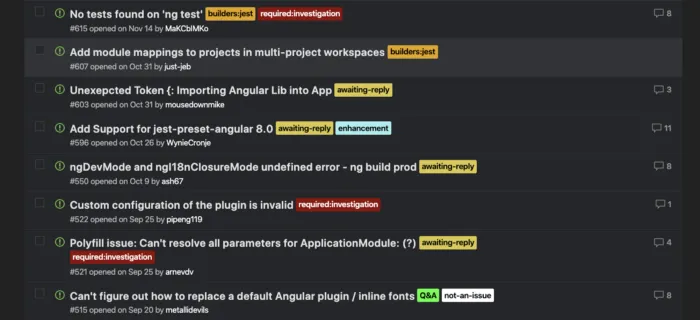
Labels make it pretty easy to distinguish from a quick glance what are the issues that require your (or contributors) attention, to which component these issues are related and what is required in order to proceed.
PR and Issue templates
I highly recommend you spend a few minutes of your time and define templates for Issues and PRs.
With issue and pull request templates, you can customize and standardize the information you’d like contributors to include when they open issues and pull requests in your repository.
This will save you a lot of time since you won’t have to respond to each issue or PR with a request for additional information or changes. You’ll still have to do that (because there are contributors that simply don’t pay attention to the templates) but it will happen far rarer than it would if you didn’t create templates.
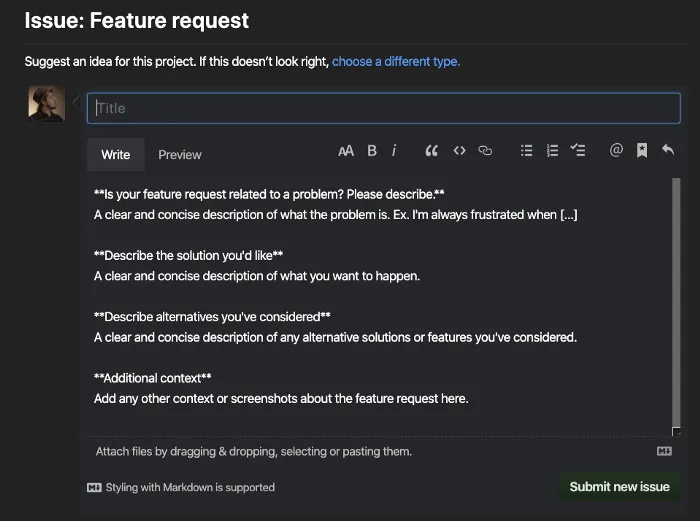
Here is an example of a default issue that you see when the corresponding template is defined in your repository:
Github apps and actions
There are quite a few Github Apps and Actions that can help you manage PRs and Issues. The list constantly grows, but I personally find these to be most useful:
Responsiveness
If I open an issue or a PR to another open source project and it takes an eternity to get a response — I switch. Here is one example:
-
The initial response was quite quick, it took only 2 days
-
The discussion was pretty fruitful
-
The PR is still open with no updates on what exactly is missing/wrong
As a result I switched to another package.
The same will hold true for your project if you’re not responsive: if it takes you 2 weeks to respond, if PRs are waiting for you, instead pending for contributor’s changes required by you — you’ll lose users, i.e. potential contributors.
So do yourself a favor — be responsive. It doesn’t have to be an immediate solution to someones problem but even letting the user know that you’ll look into their issue next week already gives them some certainty and time frames.
The bad news — you should stand by your promises.
But if you didn’t, don’t worry — we all have personal lives and it’s understandable if you had some urgent matters which postponed your work on the open source. Give a short update — it’s not a big deal, just write a word or two to let people know that the feature they’ve been waiting for is postponed.
Prioritization
There are a few methods that can help you prioritize the most important issues.
First, how does one identify the most important issues? As I see it, the most important issues are the ones that users want the most, be it a new feature, a bug-fix or something else. Sometimes a user will express their interest in the issue but most likely, they won’t… Therefore, I present to you quite a simple way to know what users are interested in.
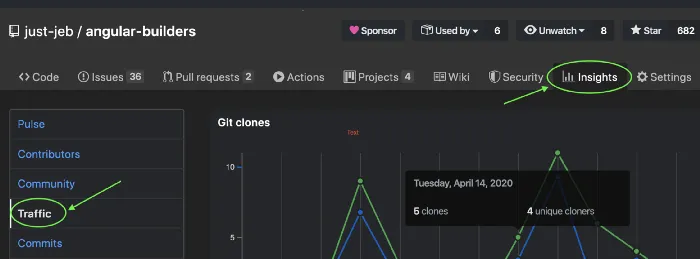
Every project on Github has an Insights tab, with a Traffic section:
At the bottom of this section you can find the Popular Content table which gives you insights into which pages are most viewed by your visitors:
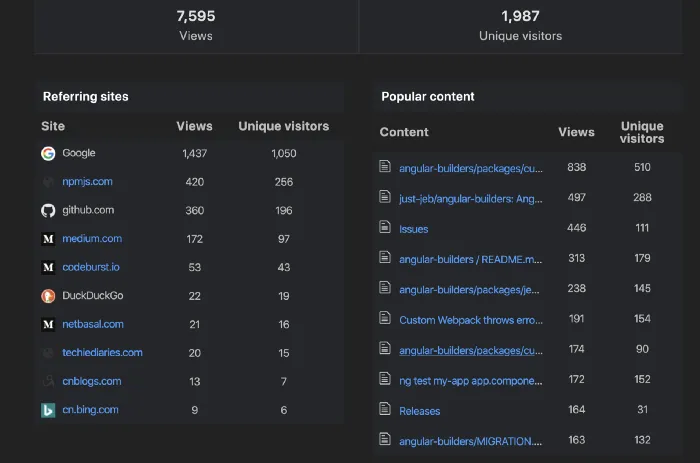
The most visited pages in this table, the issues among them, show what is probably important to the users.
When you identified the most important issues you need to highlight them on the issues page. Here are a few ways to do that:
Pin the issue
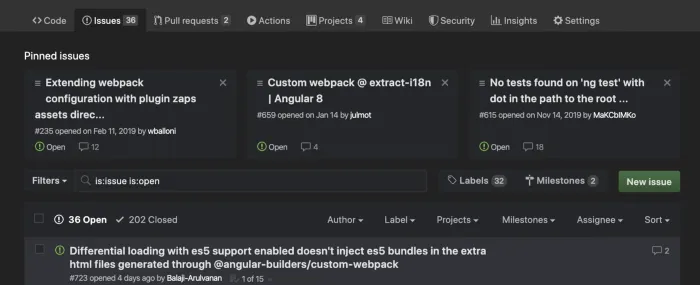
You can have up to 3 pinned issues per repository. Pinned issues appear at the top of your issues page so it’s nearly impossible to miss them:
Add a label
We already talked about using the labels and this is an excellent example for applying the help-wanted as well as priority:high labels. Those labels will let the potential contributors know that this issue is important and any help is appreciated.
Continuous Integration
Having every Pull Request built and tested before it is merged into the master will give you (depending on the test coverage) a decent amount of confidence in the code you’re about to merge into your master branch.
While I couldn’t but mention it as a part of the PR management process, it’s an automation of a task that otherwise you’ll have to do yourself, therefore it is not directly related to PR management. You can still check out every PR, build it locally, run the tests and merge if everything is green therefore Continuous Integration is not directly related to the PRs management.
Don’t worry though, we’ll cover it in detail in the next chapter.
Wrapping it up
It is very important to keep your project clean and organized because as we all know — cleanliness is next to godliness. Not only does it make the management process more effective, but it also improves the overall impression of your project.
PRs and issues along with the codebase are integral parts of your open source projects facade. Don’t underestimate their value.
In the next part we’ll discuss Automation, which is crucial for every open source project and can drastically reduce the time you have to invest into it.